
Your customers don't all drive the same number of miles or kilometers, so why remind them about maintenance on the same schedule?
With Steer's Predictive Maintenance Reminders, you can reach customers based on estimated vehicle usage, elapsed time, or whichever comes first. This helps your shop send more relevant reminders, encourage routine maintenance, and bring customers back when service is due.
You can also use estimated odometer readings to build targeted marketing campaigns for specific maintenance milestones, such as a 30,000-mile service package.
In this article, we'll cover how to enable Predictive Maintenance Reminders, configure service intervals using miles, kilometers, or time, and use vehicle data to create targeted maintenance campaigns.
To learn more about how the estimation works, see our help article HERE.
Jump To:
Understanding Predictive Maintenance Reminders
Enabling Predictive Maintenane Reminders
Configure Maintenance Reminder Conditions - Time, Mileage, or Hybrid
Set Up Your Maintenance Reminder Campaigns
Build Targeted Maintenance Reminders with the Odometer Filter
Where will Predictive Maintenance Reminders Appear In Steer
Understanding Predictive Maintenance Reminders
Understanding Predictive Maintenance RemindersPredictive Maintenance Reminders use available vehicle data, including the vehicle year and past invoices, to estimate a vehicle's current odometer reading and predict when maintenance will be due.
Rather than relying exclusively on a fixed number of days, your shop can use estimated driving habits to better align reminders with recommended service intervals.
Choose How Maintenance Becomes Due
Steer supports three types of maintenance reminder conditions:
| Reminder condition | How it works |
|---|---|
| Time (Days) | Maintenance becomes due after a specified number of days. |
| Distance (Miles or Kilometers) | Maintenance becomes due after a specified number of miles or kilometers. |
| Hybrid (Time + Distance) | Maintenance becomes due based on whichever condition occurs first. |
Why Use Hybrid Maintenance Reminders?
Every customer has different driving habits. Some put thousands of miles on their vehicles each month, while others only drive a few miles a day.
Using only time or distance to determine when maintenance is due doesn't always account for those differences.
Hybrid Maintenance Reminders help your shop reach customers based on both estimated vehicle usage and elapsed time.
Think of the oil change sticker your shop places on a customer's windshield. It typically recommends the next service at a specific mileage or date, whichever comes first.
Hybrid reminders work the same way.
Example: Your shop recommends an oil change every 8,000 kilometers or six months.
- Customer A drives frequently and reaches the estimated 8,000-kilometer interval in four months. Their maintenance becomes due based on distance.
- Customer B drives less frequently and doesn't reach 8,000 kilometers within six months. Their maintenance becomes due based on time.
Using Hybrid reminders helps your shop:
- Reach frequent drivers sooner. Customers who drive more may reach their service interval before a time-based reminder would be sent.
- Stay connected with low-mileage drivers. Certain maintenance services are recommended based on elapsed time, even when a vehicle hasn't traveled many miles.
- Make outreach more relevant. Align reminders with both estimated vehicle usage and recommended maintenance schedules.
- Encourage consistent maintenance. Give customers a reason to return when their next service is due.
Best Practice: Consider Hybrid reminders for services with both time and distance-based recommendations, such as oil changes. Always configure your intervals according to the vehicle's maintenance requirements and applicable manufacturer recommendations.
Enabling Predictive Maintenance Reminders
If you're already using days-based Maintenance Reminders, you'll first need to enable estimated odometer calculations to take advantage of distance-based reminders.
- Log in to Steer.
- Navigate to Settings > Communication > Maintenance Reminders.
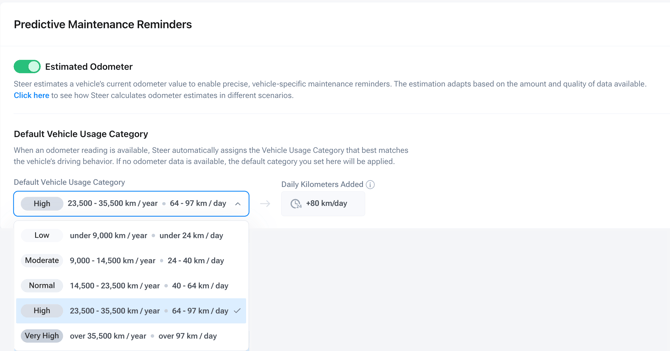
- Locate the Estimated Odometer toggle at the top of the page.
- Toggle it ON to enable predictive distance-based reminders.
- Set your Default Vehicle Usage Category.
Important: If you have multiple shops under the same Steer tenant, enabling Predictive Maintenance Reminders applies to all shops within that tenant.
Set Your Default Vehicle Usage Category
The Default Vehicle Usage Category helps Steer estimate how far a vehicle travels when there isn't enough invoice history available.
This default applies to vehicles without a closed invoice.
If your customers typically drive more or less than average, you can adjust this setting to better reflect their driving habits.
For vehicles with closed invoices, Steer uses available vehicle data and invoice history to calculate estimated usage.
To learn more, see our article explaining how estimated vehicle mileage is calculated.
Choose Miles or Kilometers
Steer supports both miles and kilometers for Predictive Maintenance Reminders.
This allows shops to configure service intervals using the distance unit they already use in their business, without manually converting between miles and kilometers.
How to Change Your Distance Unit
- Navigate to Settings > Communication > Maintenance Reminders.
- Locate the Mileage unit selector next to Flow type.
- Choose Miles or Kilometers.
- Review the Change The Mileage Unit? confirmation message.
- Confirm your selection.
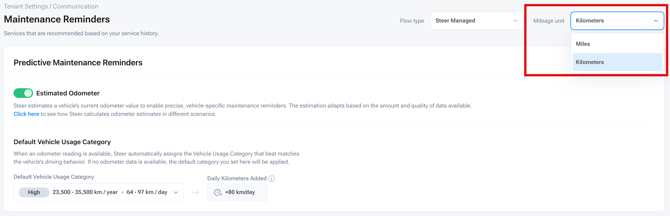
Once updated, Steer displays distance-based information in your selected unit, including:
- Vehicle usage categories in miles or kilometers per year and per day.
- Daily distance estimates.
- Distance-based Maintenance Reminder conditions.
- Known and estimated odometer readings.
- Maintenance Roadmaps and Service History.
Important: Only the Tenant Owner can change the distance unit. The selection applies to every shop within the tenant, so individual shops cannot use different units.
If you have unsaved changes to a maintenance reminder, you'll need to save or discard those changes before switching units.
Default Settings for Canadian Shops
New Steer tenants whose first shop is located in Canada automatically default to Kilometers.
New Canadian shops also receive vehicle usage presets based on Canadian driving habits. For example, the Normal usage category is calibrated to approximately 14,500–23,500 kilometers per year, or 40–64 kilometers per day.
Existing tenants remain set to Miles unless the Tenant Owner changes the setting.
What Happens to Existing Reminders When You Switch Units?
Changing between Miles and Kilometers does not reset your existing maintenance reminders or change their predicted due dates.
Steer automatically converts the displayed distance values while preserving your existing settings.
For example, a reminder configured for 18,000 miles will display as approximately 28,968 kilometers after switching to Kilometers.
You don't need to manually convert your existing reminder intervals.
Configure Your Maintenance Reminder Conditions
After enabling Predictive Maintenance Reminders and selecting your distance unit, you can choose how each maintenance service becomes due.
- From Maintenance Reminders, select the service you want to update, such as Oil Change, Tire Rotation, or Brake Service.
- Scroll to Reminder Conditions.
- Choose the condition that best matches your service recommendation.
- Enter the applicable time or distance values.
- Save your changes.
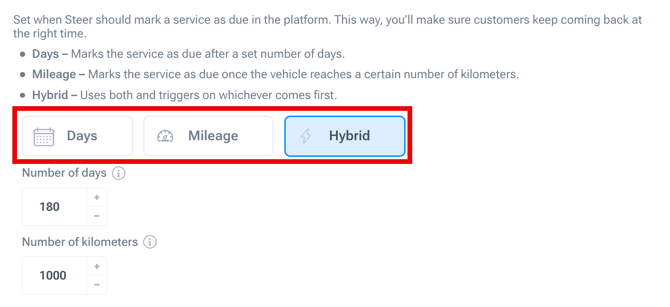
Option 1: Time-Based Reminders
Use a time-based condition when you want maintenance to become due after a specified number of days.
For example, you might recommend a service every 180 days, regardless of how far the vehicle has traveled.
This option is useful for maintenance schedules driven primarily by elapsed time.
Option 2: Mileage or Kilometer-Based Reminders
Use a distance-based condition when you want maintenance to become due after the vehicle has traveled a specified number of miles or kilometers.
For example:
- Miles: Oil change due after 5,000 miles.
- Kilometers: Oil change due after 8,000 kilometers.
Steer uses the vehicle's estimated odometer and driving habits to predict when it will reach the configured service interval.
If you're switching an existing days-based reminder to a distance-based reminder, Steer may suggest an initial distance value based on your previous days setting. You can adjust this value to match your shop's service recommendations.
⭐ Option 3: Hybrid Reminders (Time + Distance)
Hybrid reminders combine both conditions, allowing maintenance to become due based on whichever happens first.
For example, your shop can configure an oil change reminder for:
- Distance: 8,000 kilometers
- Time: 180 days
Steer uses both conditions to determine when the service becomes due.
This is particularly useful for services that should be performed regularly, even when a vehicle hasn't reached its recommended mileage or kilometer interval.
Best Practice: Review your most common maintenance services and identify which ones have both time and distance-based recommendations. These are good candidates for Hybrid reminders.
Set Up Your Maintenance Reminder Campaigns
Once you've configured your maintenance conditions, you can use them in Maintenance Reminder campaigns.
Steer maps predicted distance milestones to estimated calendar dates, allowing you to schedule outreach before or after a service becomes due.
How Reminder Send Dates Work?
Your campaign's send timing is still configured using a number of days before or after the maintenance due date.
For example, if your campaign is set to send 7 Days Before Due, Steer schedules the reminder seven days before the predicted maintenance due date.
- Time-based reminders: The due date is determined by the configured number of days.
- Distance-based reminders: The due date is predicted using the vehicle's estimated odometer and driving habits.
- Hybrid reminders: The due date is determined by whichever condition occurs first, time or predicted distance.
Where to Find This Setting
When building your Maintenance Reminder campaign, look for the How this works explanation in the campaign settings.
This section explains how estimated vehicle usage is mapped to predicted calendar dates.
Build Targeted Maintenance Reminder Campaigns with Odometer Filter
Predictive Maintenance isn't limited to automated reminders.
You can also use Steer's Odometer filter to build targeted marketing campaigns based on a vehicle's estimated mileage or kilometers.
This is especially useful for promoting maintenance packages, reaching vehicles approaching major service milestones, or creating campaigns for specific vehicle makes.
For example, if your shop offers a 25,000-mile maintenance package, you can identify customers whose vehicles are approaching that milestone and encourage them to schedule service.
How to Use the Odometer Filter
- Open Advanced Filters in Steer.
- Navigate to Vehicle Data > Odometer.
- Enter your desired odometer range in miles or kilometers, depending on your shop's settings.
- Add additional filters, such as Vehicle Make, to narrow your audience.
- Save your audience as a Dynamic Group to use in your marketing campaigns.
The Odometer filter supports values from 0 to 1,000,000 miles or kilometers.
Best Practice: Combine Odometer with Other Filters
Combining odometer readings with other vehicle and customer information helps you reach the right customers with more relevant maintenance offers.
Here are a few campaign ideas to get started:
| Campaign idea | Suggested filters |
|---|---|
| 25,000-Mile Maintenance Package | Odometer: 23,000–25,000 miles |
| Vehicle Make 30,000-Mile Service | Vehicle Make + Odometer: 28,000–30,000 miles |
| High-Mileage Vehicle Checkup | Odometer: 100,000–110,000 miles |
Where Predictive Maintenance Reminders Will Appear
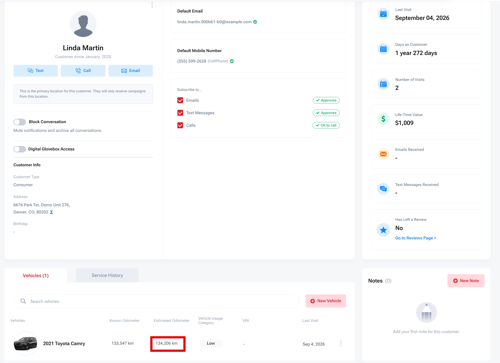
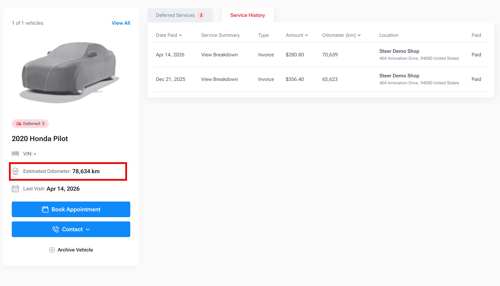
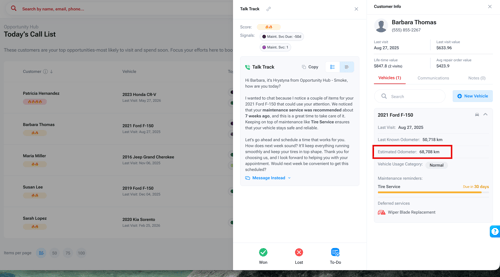
The estimated odometer reading attached to your mileage-based maintenance reminders is visible in multiple areas of the platform, providing consistent insight to vehicle usage. The estimated odometer reading is also visible in the campaign building area, allowing your shop to include these estimates when sending campaigns and reminders.
Customer Profile
Vehicle Profile
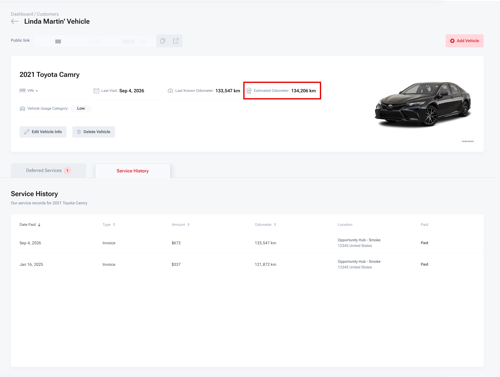
Public Vehicle Page
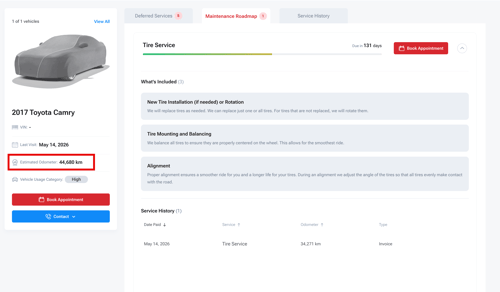
Digital Glovebox
Opportunity Hub
Campaign Builder Integration: Mapping Estimated Mileage to Dates
Within the campaign builder, a new section explains how the predictive maintenance reminders map estimated mileage to predicted calendar dates when enabled.
This mapping is done behind the scenes and enables campaigns to send notifications timed perfectly as vehicles approach maintenance milestones, making customer outreach more relevant and effective.
Note: The setting for when to send a campaign is still based on a number of days before/after the Maintenance Reminder is due.
Example: Your oil change campaign is set to send 7 Days Before Due - this means Steer will send the campaign 7 days before the customer reaches the estimated odometer reading, allowing for more concise notifications.
Where to find:
When building a campaign, look for the 'How this works' text that explains the Mileage to Date Mapping feature in the campaign settings, which highlights how estimated odometer data drives send date predictions.

Please reach out to Customer Support if you have any questions.
- or chat with our team via the Steer platform.