
The Mobil 1™ Rebate Dashboard gives shops a simple way to join the Mobil 1™ Performance+ Program, track oil changes, and earn rebates automatically. It saves time and helps maximize shop earnings.
Jump To:
How to Enroll in Mobil 1™ Performance+
Locating the Mobil 1™ Dashboard
How to Make Sure your Mobil 1™ Invoices Apply
How to Enroll in Mobil 1 Performance+
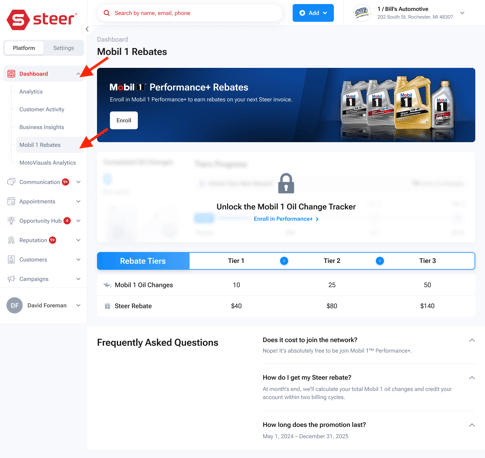
If you’re not enrolled in Mobil 1™ Performance+, you’ll see an option to sign up. Just click the “Enroll” button on the dashboard.
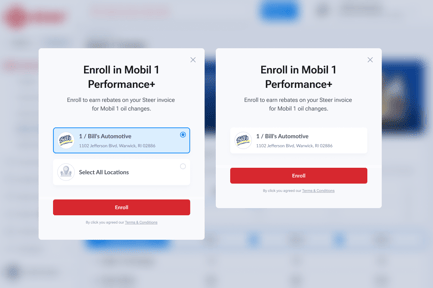
If you have multiple shops: You can enroll a single shop or all shops at the same time.
Locating the Mobil 1™ Dashboard
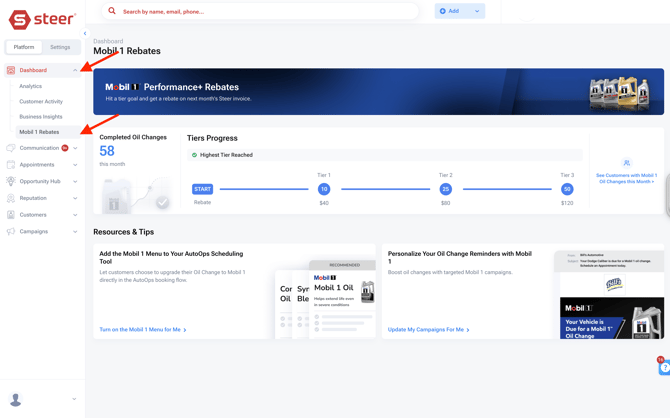
You’ll see the Mobil 1™ Rebate Dashboard in your Steer left-hand navigation menu, under the main Dashboard Tab.
Click “Mobil 1™ Rebates” on the left sidebar to view your dashboard.
Dashboard Overview and Tracking
-
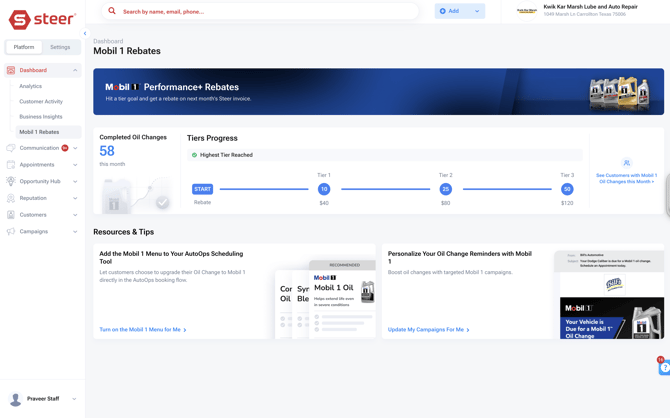
When you first visit, your completed Mobil 1™ oil change count starts at zero for the month.
-
As new invoices are created for Mobil 1™ oil changes, the dashboard updates to show how many you’ve completed.
-
The dashboard will also show how many more Mobil 1™ oil changes are needed to reach the next rebate tier.
Rebate Tiers:
-
Tier 1: Earn your first rebate after 10 Mobil 1™ oil changes.
-
Tier 2: Unlock a higher rebate after 25 oil changes.
-
Tier 3: Max out your rebate after 50 Mobil 1™ oil changes in the month.
Resources & Tips Section:
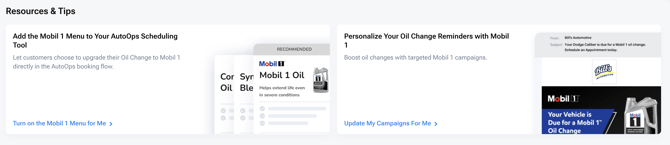
The Resources & Tips section allows you to get help with the following items:
-
Adding Mobil 1™ Menu to your AutoOps scheduling tool.
-
Updating Campaign templates to personalize reminders and encourage repeat visits.
New Campaign Filtering:
We've made it easy to target customers who have closed out a Mobil 1 invoice. With the new Mobil 1™ filter you can quickly filter to see which customers had qualifying Mobil 1™ oil change invoices this month.
Find the new filter under Customers > Customer Lists > Advanced Filters.
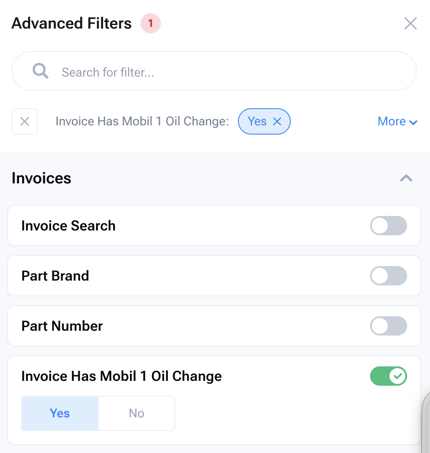
This helps with customizing follow-ups and targeted campaigns.
How to Make Sure Your Invoices Count as a Mobil 1 Oil Change:
To ensure your Mobil 1™ oil change is correctly recognized as a Mobil 1™ service, and count towards your rebates, closed invoices must include Mobil 1 ™ related keywords in the invoice description. This allows Steer to automatically match the invoice and confirm that Mobil 1™ oil was used.
Make sure the product or service description contains one of the following valid identifiers:
- “Mobil 1” (with a space, e.g., Mobil 1 5W‑30 Full Synthetic)
- “Mobil1” (without a space, e.g., Mobil1 0W‑40 Advanced Formula)
- Common typos like “Mobile One” are recognized
- “M1 ” (with a space after M1) also counts
As long as one of these appears clearly in the description, your invoice will be matched successfully as a Mobil 1™ oil change and count towards your rebate.
Examples That Count:
|
Example Invoice Line |
Will It Count? |
Why |
|
Mobil 1 5W‑30 Full Synthetic |
✅ Yes |
Contains “Mobil 1” |
|
Mobil1 0W‑40 ESP Formula M |
✅ Yes |
Matches “Mobil1” variant |
|
Mobile One ESP 0W‑40 |
✅ Yes |
Common spelling variation accepted |
|
M1 Oil Change |
✅ Yes |
“M1 ” (with space) accepted as Mobil 1 shorthand |
Examples That Do Not Count:
|
Example Invoice Line |
Will It Count? |
Why |
|
Mobil 10W‑40 Conventional |
🚫 No |
Refers to conventional oil, not Mobil 1 |
|
Mobil 10W‑30 Motor Oil |
🚫 No |
Standard Mobil product, not Mobil 1 |
|
M1Oil Change |
🚫 No |
“M1” without space isn’t matched |
Following these simple guidelines ensures your invoices are accurately recognized as Mobil 1™ oil changes every time, and that you will not miss out on your rebates.
FAQ
What if my data in the dashboard doesn't match what I expect?
There can be various reasons the number of Oil changes doesn't match what you expect
The data is updated every 24 hours, so if you are looking for data from today, it will not be shown until the next day.
If you notice any major discrepancies with the data please reach out to our support team.
What are the Mobil 1™ Performance+ Terms & Conditions?
To participate in the Performance+ program, customers must opt-in by providing their shop details (name, phone, email) and activate Mobil 1™ oil change reminders in Steer.
Key Requirements & Terms
-
Qualifying Oil: Participants must purchase and use Mobil 1™ oil for the service. Only Mobil 1™ brand oil changes will count toward the monthly tier calculations; other oil brands are excluded.
-
Purchase Flexibility: Mobil 1™ oil can be purchased from any distribution channel (retail, wholesale, distributor).
-
Documentation: To qualify for tier counting, the invoices in the shop management system and the customer SMS must clearly specify "Mobil 1" (e.g., "Mobil 1 0W-20"), avoiding generic terms (e.g., "Premium Full Synthetic").
-
Consent and Finality: Participation implies agreement to the Terms and Conditions and consent to receive future promotional offers from Mobil 1™. Both Steer and Mobil 1™ reserve the right to modify or terminate the program, and their decisions on eligibility and calculations are final.
For full terms & conditions of the Mobil 1 Performance+ Program, Click Here.