Jump To:
🔴 Important SMS Message Limit Information.
What are the Segment Limits in AutoOps?
What are the Segment Limits in Steer?
What are SMS Segments?
Think of a single SMS message as being sent in little boxes called segments. These boxes (segments) can only hold a certain amount of data (text character amount) depending on the content of your SMS message.
General SMS Segment Limits.
Below are the two main limits you need to remember when it comes to SMS messages:
1. The Standard Limit (The "Small Box"):
-
160 Characters: A single SMS segment can hold up to 160 characters (letters, numbers, basic punctuation).
2. The Special Character Limit (The "Even Smaller Box"):
-
70 Characters: If your message contains any special characters, like emojis, accented letters (like ñ or é), or non-Latin script, the limit for the entire segment drops to only 70 characters. This is because those characters take up more data "space."
🔴 Important SMS Message Limit Information.
Token Utilization Impact on Character/Segment Limits:
In both AutoOps and Steer, there are tokens available that you can utilize in your SMS messaging.
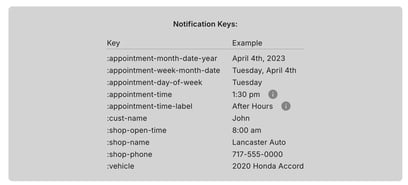
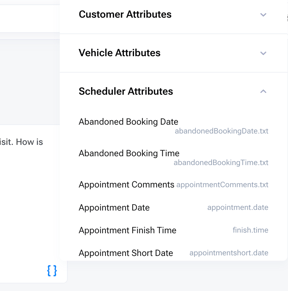
When using these tokens, the content that the token generates into the message will be counted toward the character limits of your SMS messaging.
For example, if you use the token that inputs the Customer's Name into the SMS message, the character count of the customer's actual name is what will be counted for your character & segment limits.
Token: {address1.txt} - characters = 14 (this is not the count that affects your character limit).
Inserted text: 123 South Main Street - characters= = 21 (this count will go towards the character limit).
What are the Segment Limits in AutoOps?
🚨In AutoOps, you are allowed to send up to two (2) segments per SMS message. This is equivalent to 320 plain characters (letters, numbers, basic punctuation).
For best results, keep messages under 300 characters — customers respond better to short, focused messages.🚨
The segment limits are in effect on your Appointment Notification SMS Messages; located in AutoOps under General > Notification Setup.
When creating, or editing, your Appointment Notifications, you will see the following message regarding segment limits:
Estimated Segments: X (max 2)
X = the amount of segments your message content fills.
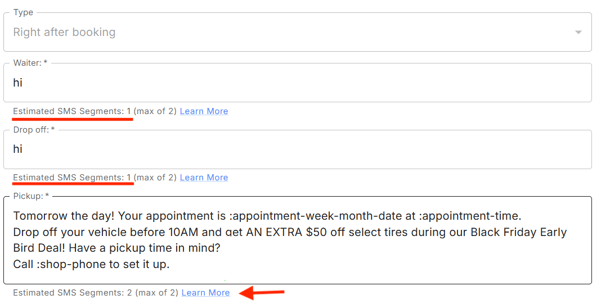
If you exceed the segment limits in your messaging, you will see the following message:
Estimated SMS Segments: 4 (max of 2)  Special characters detected: curly apostrophe. Please replace these with plain characters to reduce the message length.

What are the Segment Limits in Steer?
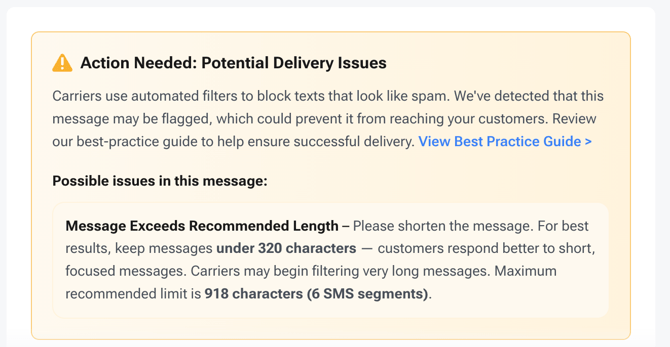
🚨In Steer, you are allowed to send up to two (6) segments per SMS message. This is equivalent to 918 plain characters (letters, numbers, basic punctuation).
For best results, keep messages under 320 characters — customers respond better to short, focused messages.🚨
The segment limits are in effect on all Active SMS Campaigns and Appointment Related SMS Messaging.
When creating, or editing, your Campaigns or Appointment Notifications, you will see the following count regarding segment limits:
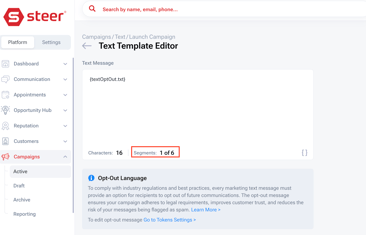
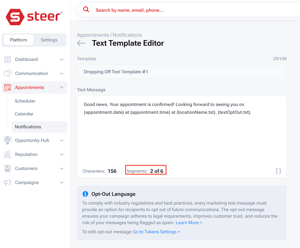
If you exceed the segment limits in your messaging, you will see the following warning message: