
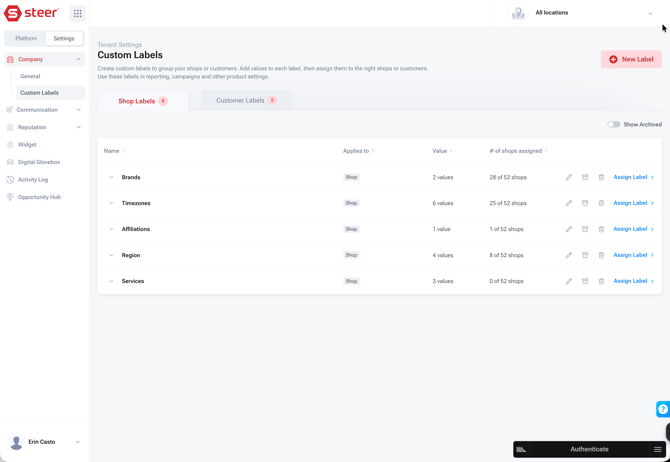
Not every shop in your organization operates the same way. Your locations may operate under different brands, serve different markets, offer different services, or participate in different promotions.
Custom Labels allow you to group your shop locations based on the characteristics they share. These groups can then be used in Campaign Builder to create and customize campaigns across multiple locations without having to build campaigns for each shop individually.
For example, you can group your shops by region and create variations of a seasonal maintenance campaign with different banners, offers, or calls to action based on the needs of each market.
What can you do with Audience Sync?
- Reach customers across more channels: Use your Steer campaign audiences in Google Ads, Meta Ads, or both.
- Save time managing customer lists: No need to manually export and upload audiences to your advertising accounts.
- Keep audiences up to date: Customers are automatically added or removed as they meet your campaign's targeting criteria.
- Stay in control: Your advertising accounts, campaigns, and budgets remain under your management.
Jump To:
Assigning a Label to Locations
Using Labels in Campaign Building
Best Practices for Custom Labels
Creating Custom Labels
Custom Labels are configured at the Tenant level.
- Navigate to Settings > Company > Custom Labels.
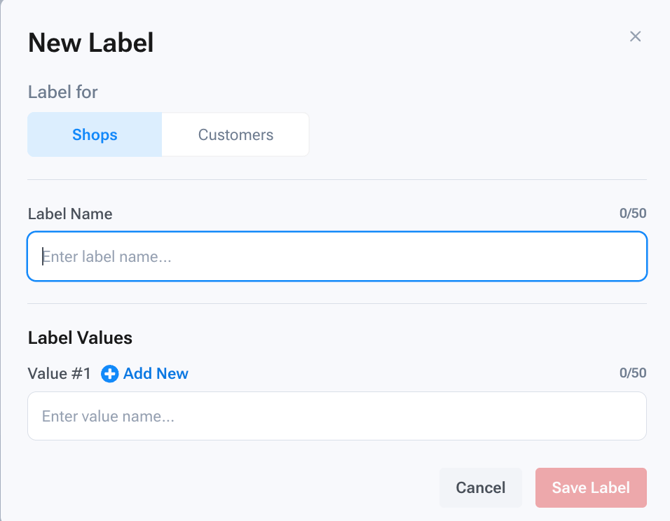
- Click +New Label.
- Enter a Label Name. This should represent the high-level category you want to use to organize your shops, such as Geographic Region, Brand, or Regional Manager.
- Enter your Label Values. You can add multiple values to a single label.
- Click Save Label.
Tip: Create labels that can be reused across multiple campaigns. For example, instead of creating separate labels for Northeast and Southeast shops, create a single Geographic Region label with Northeast and Southeast as its values.
Assigning a Label to Locations
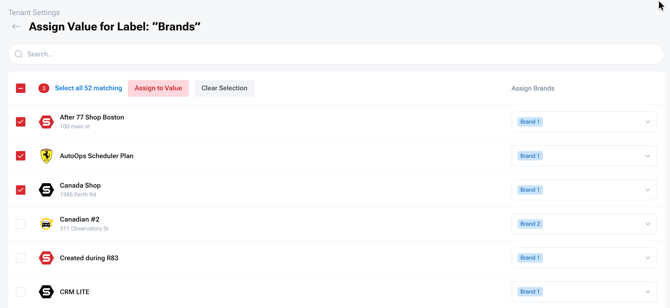
Once you've created your Custom Labels, you can assign them to the appropriate shop locations.
- Click Assign Label.
- Select the shops associated with the label value.
Repeat this process for each label value you want to assign to your locations.
Using Custom Labels in Campaigns
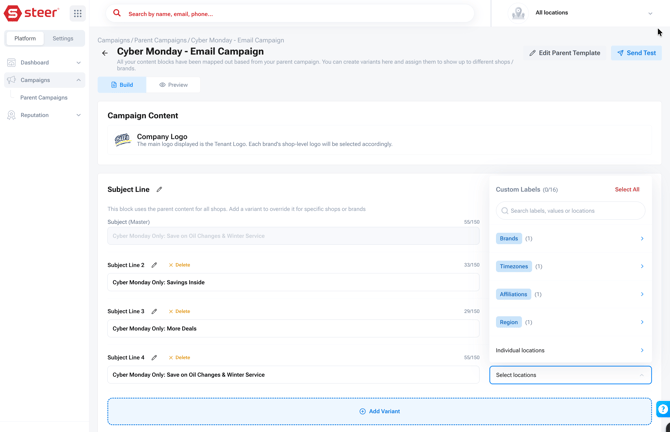
Once your labels have been created and assigned, you can use them when building campaigns across multiple shop locations.
Custom Labels allow you to create campaign variations for specific groups of shops. Depending on the needs of each group, you can customize elements of your campaign, including:
- Campaign banners and imagery
- Branding
- Promotional offers
- Campaign messaging
- Calls to action
This allows you to manage your marketing efforts at the organizational level while keeping campaigns relevant to individual brands, markets, and shop locations.
Ways to Use Campaign Labels
How you organize your shops will depend on your organizational structure, marketing goals, and the differences between your locations. Below are several ways you can use Custom Labels to support your marketing strategy.
Group Shops by Geographic Region
Shops in different markets may experience different weather conditions, seasonal service needs, or customer demand.
Suggested label: Geographic Region
Example values:
- Northeast
- Southeast
- Midwest
- West Coast
Put it into practice:
Create a seasonal maintenance campaign with variations based on the needs of each region. Shops in colder climates can promote battery checks, winter tires, and winterization services, while shops in warmer climates can promote A/C inspections and cooling system maintenance.
You can coordinate a seasonal marketing initiative across your organization while keeping your messaging relevant to each market.
Group Shops by Brand
If your organization operates under multiple brands or participates in branded programs, Custom Labels can help you maintain consistent branding across your campaigns.
Suggested label: Brand
Example values:
- Mobil 1
- Brand A
- Brand B
Put it into practice:
Create an oil change campaign with a branded banner and promotional offer for your Mobil 1 locations, while creating a general oil change promotion for your other shops.
Each group receives campaign content that reflects its brand identity and available promotions.
Group Shops by Shop Type or Services Offered
Not every location offers the same services. Grouping shops by their capabilities helps ensure you're promoting services that customers can actually receive at their local shop.
Suggested label: Shop Type
Example values:
- Quick Lube
- Full Service
- Tire Shop
Suggested label: Services Offered
Example values:
- Fleet Maintenance
- Tire and Alignment Services
- Diesel Repair
- EV and Hybrid Services
- State Inspections
Put it into practice:
Create a spring maintenance campaign that promotes oil changes at your quick-lube locations, multi-point inspections at your full-service shops, and tire and alignment services at participating locations.
You can also use these groupings to launch campaigns exclusively at locations that offer specialized services.
Group Shops by Regional or District Manager
Organize locations based on your existing management structure to help coordinate marketing efforts across districts or operating groups.
Suggested label: District Manager
Example values:
- District 1
- District 2
- District 3
Put it into practice:
If a district is running a regional promotion or participating in a community event, you can create a campaign specifically for the shops within that district without selecting each location individually.
Group Shops by Business Goals
Different locations may have different business priorities. Custom Labels can help you support those priorities with targeted marketing initiatives.
Suggested label: Business Goals
Example values:
- Customer Acquisition
- Customer Retention
- Increase Appointment Volume
- Grow Average Repair Order
- Recover Deferred Services
Put it into practice:
Shops looking to increase appointment volume can run a limited-time service promotion, while shops focused on customer retention can run a customer appreciation or winback campaign.
Review these label assignments regularly as the needs and priorities of your shops change.
Group New or Recently Acquired Locations
Newly opened or acquired shops may require a different marketing approach than established locations.
Suggested label: Location Lifecycle
Example values:
- Coming Soon
- Newly Opened
- Recently Acquired
- Established
Put it into practice:
Create a grand opening campaign for new locations, introduce customers to a recently acquired shop's new brand, or promote an introductory service offer.
Your established locations can continue following your regular marketing calendar while newer shops receive additional marketing support.
Group Shops by Marketing Program Participation
Some promotions, partnerships, and loyalty programs may only be available at participating locations.
Suggested label: Marketing Programs
Example values:
- Loyalty Program
- Manufacturer Promotions
- Community Events
- Seasonal Promotions
Put it into practice:
Launch a loyalty rewards promotion exclusively at participating shops or advertise a manufacturer-sponsored rebate at eligible locations.
This helps ensure customers receive offers that are available at their local shop.
Create Pilot Groups to Test Campaigns
Custom Labels can also help you test new marketing strategies before introducing them across your entire organization.
Suggested label: Campaign Testing
Example values:
- Pilot Group A
- Pilot Group B
Put it into practice:
Test a $20-off service promotion at one group of shops and a percentage-off promotion at another. Compare campaign performance to help determine which offer may be more effective for a broader rollout.
When testing campaigns, select shops with similar customer bases, service offerings, and appointment volumes. Keep other campaign elements consistent so you can better understand the impact of the offer you're testing.
Best Practices for Custom Labels
Think about the campaigns you run today and the campaigns you'd like to run in the future. Identify where differences between your shops require different messaging, offers, or branding.
Build your labels around those differences.
Create Broad Categories with Specific Values
Keep your label names broad enough to accommodate additional values as your organization grows.
| Instead of creating these individual labels | Create one label with multiple values |
|---|---|
| East Coast, West Coast, Midwest | Geographic Region |
| Brand A, Brand B, Brand C | Brand |
| Quick Lube, Full Service, Tire Shop | Shop Type |
| District 1, District 2, District 3 | District |
This keeps your labels organized and makes them easier to manage as you add locations.
Use Consistent Naming Conventions
Choose clear, recognizable names that everyone responsible for managing campaigns can understand.
For example, avoid creating separate values for Northeast, NE, and North East if they all represent the same region.
Separate Long-Term and Temporary Groupings
Some labels represent characteristics that rarely change, while others support short-term marketing initiatives.
| Long-Term Groupings | Temporary Groupings |
|---|---|
| Geographic Region | Grand Opening |
| Brand | Holiday Promotion |
| Shop Type | Campaign Pilot |
| Services Offered | Increase Appointment Volume |
| Management Structure | Community Event |
Review temporary groupings more frequently to ensure shops are still assigned to the appropriate values.
Incorporate Labels into Your New Location Setup
When opening or acquiring a new shop, make assigning Custom Labels part of your location setup process.
This helps ensure new shops are included in relevant marketing initiatives moving forward.
Review Your Assignments Regularly
As your organization grows, your shops may change brands, expand their services, participate in new programs, or move between districts.
Review your Custom Labels periodically to ensure they continue to reflect your organization's structure and marketing priorities.
Please reach out to Customer Support if you have any questions.
- or chat with our team via the Steer platform.