---
title: "Steer Smart Search: Build Customer Segments Quick!"
description: Describe it, build it, send it. Smart search turns your descriptions into ready-to-use segments instantly, letting you focus on your message instead of filters.
---
[Skip to content](https://help.steercrm.com/knowledge/steer-smart-search#main-content)
English
Show submenu for translations
[](https://help.steercrm.com/knowledge?hsLang=en)
- Events & Webinars
Show submenu for Events & Webinars
- [2026 July Town Hall](https://steer.io/events/july-town-hall-2026)
- [All Recorded Events](https://steer.io/events)
- Campaign Templates
Show submenu for Campaign Templates
- [Email Templates](https://steer.io/email-templates)
- [Post Card Templates](https://steer.io/direct-mail-postcards)
- [Letter Templates](https://steer.io/direct-mail-letters)
- Video Tutorials
Show submenu for Video Tutorials
- AutoOps Tutorials
- Steer Tutorials
- Steer Phones Tutorials
- Login
Show submenu for Login
- [AutoOps Dashboard](https://dashboard.autoops.com)
- [Steer Dashboard](https://app.steercrm.com)
- [Steer Phones Dashboard](https://phones.steerphones.com)
Open main navigation
Close main navigation
- Events & Webinars
Show submenu for Events & Webinars
- [2026 July Town Hall](https://steer.io/events/july-town-hall-2026)
- [All Recorded Events](https://steer.io/events)
- Campaign Templates
Show submenu for Campaign Templates
- [Email Templates](https://steer.io/email-templates)
- [Post Card Templates](https://steer.io/direct-mail-postcards)
- [Letter Templates](https://steer.io/direct-mail-letters)
- Video Tutorials
Show submenu for Video Tutorials
- AutoOps Tutorials
- Steer Tutorials
- Steer Phones Tutorials
- Login
Show submenu for Login
- [AutoOps Dashboard](https://dashboard.autoops.com)
- [Steer Dashboard](https://app.steercrm.com)
- [Steer Phones Dashboard](https://phones.steerphones.com)
- English
Show submenu for translations
- [Support](mailto:help@steer.io)
[Support](mailto:help@steer.io)
How can we help you?
- There are no suggestions because the search field is empty.
1. [Help Center](https://help.steercrm.com/knowledge?hsLang=en)
2. [Marketing](https://help.steercrm.com/knowledge/marketing?hsLang=en)
3. [Campaign Creation & Management](https://help.steercrm.com/knowledge/marketing?hsLang=en#campaign-creation-management)
April 5, 2026
# Steer Smart Search: Build Customer Segments Quick!
## Describe it, build it, send it. Smart search turns your descriptions into ready-to-use filtered groups instantly, letting you focus on your message instead of filters.
⬇️ Watch the quick tutorial below on **Smart search** 👀
Launch campaigns faster than ever with **Smart Search**. Just tell Steer who you’re looking for, and we’ll handle the segment building for you, eliminating manual filtering.
**Jump to:**
[How to Use Smart Search](https://help.steercrm.com/knowledge/steer-smart-search#how-to-utilize-smart-search)
[-\> Creating Customer Groups using Smart Search Results](https://help.steercrm.com/knowledge/steer-smart-search#dynamic-group)
[-\> Adding the Smart Search Result Group to a Campaign Segment](https://help.steercrm.com/knowledge/steer-smart-search#list-in-campaign)
[Suggested Smart Search Prompts](https://help.steercrm.com/knowledge/steer-smart-search#suggested-smart-search-prompts)
[-\> Smart Search Inspiration](https://help.steercrm.com/knowledge/steer-smart-search#smart-search-inspo)
---
### How to Use Smart Search
In Steer, navigate to:
1\. **Customers** \> **Customer List**
2\. In the upper right, click **Smart Search.**
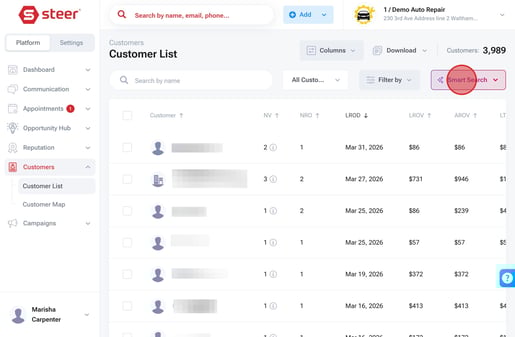
3\. Choose from the [Suggested Searches](https://help.steercrm.com/knowledge/steer-smart-search#suggested-smart-search-prompts), or enter your own custom prompt.
5\. Hit **Find Customers** & let Steer do the work for you.
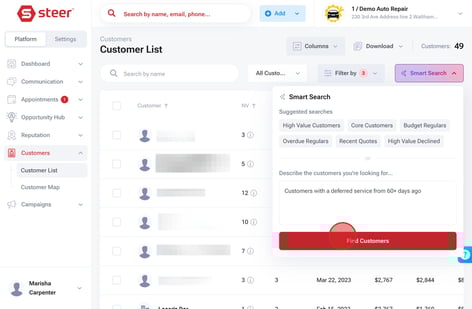
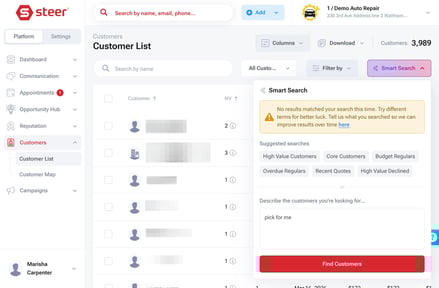
6\. Steer will provide a filtered customer list based on your search criteria. If Steer is unable to produce results, try rewording your criteria in a more specific manner. You can also submit feedback for Smart Search enhancements to our team!
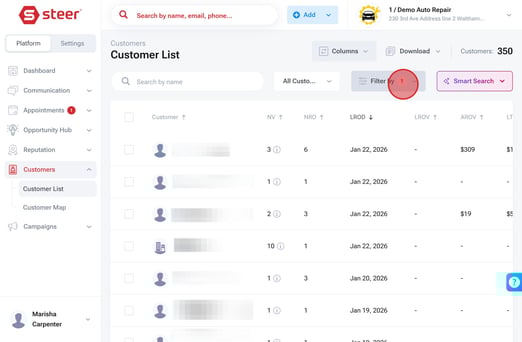
Want to send a campaign to the group you just created? You'll just turn this list into a dynamic customer group.
---
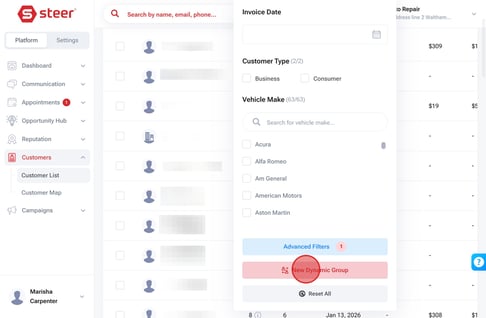
1. Click **Filter By,** then select **Advanced Filters.
**
2. Click **+ New Dynamic Group.
**
3. Input a name for your group like *Customers with Deferred Services 60+ Days Ago
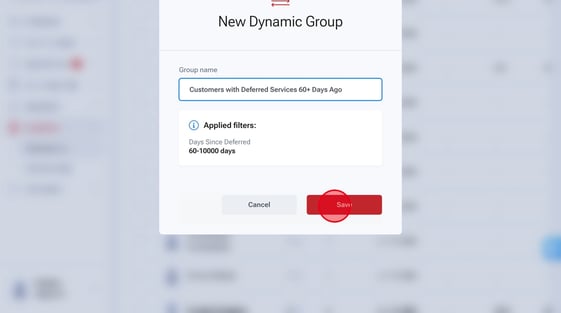*
4. Click **Save.**
Your smart search group is ready to be used in marketing campaigns!
**To add this list to a text or email blast:**
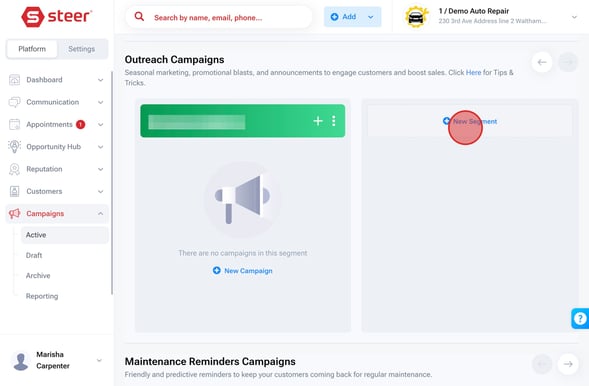
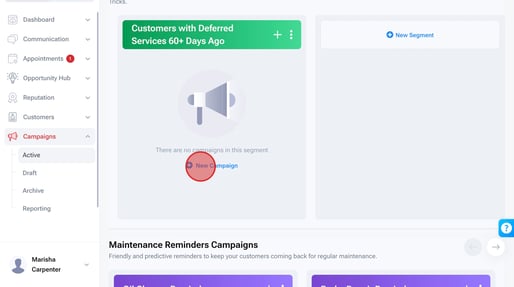
1. Go to **Campaigns** \> **Active.**
2. Under **Outreach Campaigns**, click **+ New Segment
**
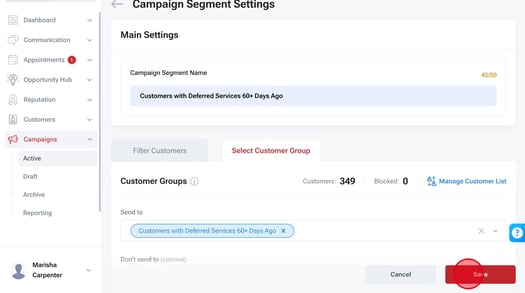
3. Name your segment something like: *Customers with Deferred Services 60+ Days Ago*
4. Click **Select Customer Group.**
5. Under Send To, select your recent group from the list.
6. **Save** your segment.
7. Now it's time to create your campaign in the segment you just created! For step-by-step instructions on creating a campaign, **[click here.](https://help.steercrm.com/knowledge/campaigns-settings#campaign-settings)**
### Suggested Smart Searches
Smart Search comes pre-configured with six suggested searches you can utilize, or you can describe the customers you would like to target.
The table below explains the customers being targeted when you utilize one of the six suggested searches.
| **Suggested Search:** | **Targeted Customers (applied filters):** |
| --- | --- |
| High Value Customers | `Days Since Last Visit = 10,000` **+** `Lifetime Visits = 3-10,000` **+** `Life-Time Visit Value = 5,000-1,000,000 ` |
| Core Customers | `Lifetime Visits = 2-10,000` **+** `Life-Time Visit Value = 1,500-5,000 ` |
| Budget Regulars | `Lifetime Visits = 2-10,000` **+** `Life-Time Visit Value = 0-1,500` |
| Overdue Regulars | `Days Since Last Visit = 180-10,000` **+** `Lifetime Visits = 3-10,000` |
| Recent Quotes | `Days Since Quote = 7-10,000` |
| High Value Declined | `Lifetime Visits = 2-10,000` **+** `Deferred Service = Yes` **+** `Deferred Service Search = (high value services)` **+** `Deferred Service Date = Last 180 Days` **+** `Average Visit Value = 400-1,000,000` |
### Want to create your own searches?
Use the prompts below as inspiration for crafting your own smart search prompts:
- Customers that did NOT come in last month
- Customers with deferred services in the past 60 days
- Customers who have a deferred service with the keyword 'Brake' who have not visited the shop in the past 3 months
- Customers who have spent at least $3,000 in their lifetime, have a deferred service and an oil change due in the next 3 months
- [Booking](https://help.steercrm.com/knowledge/booking?hsLang=en#main-content)
- [Steer x AutoOps](https://help.steercrm.com/knowledge/booking?hsLang=en#steer-x-autoops)
- [Lead Management & Marketing Tracking](https://help.steercrm.com/knowledge/booking?hsLang=en#lead-management-marketing-tracking)
- [Availability & Capacity Management](https://help.steercrm.com/knowledge/booking?hsLang=en#availability-capacity-management)
- [Issue Tree Management](https://help.steercrm.com/knowledge/booking?hsLang=en#issue-tree-management)
- [Steer Scheduling Tool (Retiring Soon)](https://help.steercrm.com/knowledge/booking?hsLang=en#steer-scheduling-tool-retiring-soon)
- [AutoOps Websites](https://help.steercrm.com/knowledge/autoops-websites?hsLang=en#main-content)
- [Tutorials & Videos](https://help.steercrm.com/knowledge/autoops-websites?hsLang=en#tutorials-videos)
- [Website Editor Guides](https://help.steercrm.com/knowledge/autoops-websites?hsLang=en#website-editor-guides)
- [AutoOps Pro Features](https://help.steercrm.com/knowledge/autoops-pro-features?hsLang=en#main-content)
- [AutoOps Website Chat](https://help.steercrm.com/knowledge/autoops-pro-features?hsLang=en#autoops-website-chat)
- [Phones](https://help.steercrm.com/knowledge/phones?hsLang=en#main-content)
- [Step-By-Step Guides](https://help.steercrm.com/knowledge/phones?hsLang=en#step-by-step-guides)
- [Understanding Steer Phones](https://help.steercrm.com/knowledge/phones?hsLang=en#understanding-steer-phones)
- [Marketing](https://help.steercrm.com/knowledge/marketing?hsLang=en#main-content)
- [Outreach Planning](https://help.steercrm.com/knowledge/marketing?hsLang=en#outreach-planning)
- [Campaign Creation & Management](https://help.steercrm.com/knowledge/marketing?hsLang=en#campaign-creation-management)
- [Follow-Up Campaigns](https://help.steercrm.com/knowledge/marketing?hsLang=en#follow-up-campaigns)
- [Outreach Campaigns](https://help.steercrm.com/knowledge/marketing?hsLang=en#outreach-campaigns)
- [Maintenance Reminder Campaigns](https://help.steercrm.com/knowledge/marketing?hsLang=en#maintenance-reminder-campaigns)
- [Deferred Service Campaigns](https://help.steercrm.com/knowledge/marketing?hsLang=en#deferred-service-campaigns)
- [Steer Reviews & Surveys](https://help.steercrm.com/knowledge/steer-reviews-surveys?hsLang=en#main-content)
- [Reputation Management](https://help.steercrm.com/knowledge/steer-reviews-surveys?hsLang=en#reputation-management)
- [Steer Surveys](https://help.steercrm.com/knowledge/steer-reviews-surveys?hsLang=en#steer-surveys)
- [Steer Dashboard Analytics](https://help.steercrm.com/knowledge/steer-dashboard-analytics?hsLang=en#main-content)
- [Steer Data & Analytics](https://help.steercrm.com/knowledge/steer-dashboard-analytics?hsLang=en#steer-data-analytics)
- [Steer Dashboard Management](https://help.steercrm.com/knowledge/steer-dashboard-analytics?hsLang=en#steer-dashboard-management)
- [Steer Customer & Vehicle Profiles](https://help.steercrm.com/knowledge/steer-dashboard-analytics?hsLang=en#steer-customer-vehicle-profiles)
- [Steer Ultimate](https://help.steercrm.com/knowledge/steer-ultimate?hsLang=en#main-content)
- [Auto-Reply](https://help.steercrm.com/knowledge/steer-ultimate?hsLang=en#auto-reply)
- [Call Intelligence/CallerID+](https://help.steercrm.com/knowledge/steer-ultimate?hsLang=en#call-intelligence-callerid)
- [Digital Glovebox](https://help.steercrm.com/knowledge/steer-ultimate?hsLang=en#digital-glovebox)
- [Opportunity Hub/Today's Call List](https://help.steercrm.com/knowledge/steer-ultimate?hsLang=en#opportunity-hub-todays-call-list)
- [Mobil 1™ Performance+](https://help.steercrm.com/knowledge/mobil-1-performance?hsLang=en#main-content)
- [Mobil 1 AutoOps Menu](https://help.steercrm.com/knowledge/mobil-1-performance?hsLang=en#mobil-1-autoops-menu)
- [Mobil 1 Dashboard & Rebates](https://help.steercrm.com/knowledge/mobil-1-performance?hsLang=en#mobil-1-dashboard-rebates)
- [Mobil 1 Maintenance Reminders](https://help.steercrm.com/knowledge/mobil-1-performance?hsLang=en#mobil-1-maintenance-reminders)
- [Admin & Settings](https://help.steercrm.com/knowledge/admin-settings?hsLang=en#main-content)
- [Steer General Settings](https://help.steercrm.com/knowledge/admin-settings?hsLang=en#steer-general-settings)
- [Integrations](https://help.steercrm.com/knowledge/admin-settings?hsLang=en#integrations)
- [Texting Compliance](https://help.steercrm.com/knowledge/admin-settings?hsLang=en#texting-compliance)
- [User Permission & Notifications Settings](https://help.steercrm.com/knowledge/admin-settings?hsLang=en#user-permission-notifications-settings)
- [What's New?](https://help.steercrm.com/knowledge/whats-new?hsLang=en#main-content)
- [Steer Updates: 2026](https://help.steercrm.com/knowledge/whats-new?hsLang=en#steer-updates-2026)
- [2025 & Older Releases](https://help.steercrm.com/knowledge/whats-new?hsLang=en#2025-older-releases)
[](https://help.steercrm.com/knowledge?hsLang=en)
[Book a Demo](https://steer.io/book-a-demo)
Copyright © 2025, Steer