---
title: "March 2026 Town Hall: Recap & Recording"
description: "March Town Hall: What's new, what's coming soon, and a sneak peek at Phones."
---
[Skip to content](https://help.steercrm.com/knowledge/march-2026-town-hall#main-content)
English
Show submenu for translations
[](https://help.steercrm.com/knowledge?hsLang=en)
- Events & Webinars
Show submenu for Events & Webinars
- [2026 July Town Hall](https://steer.io/events/july-town-hall-2026)
- [All Recorded Events](https://steer.io/events)
- Campaign Templates
Show submenu for Campaign Templates
- [Email Templates](https://steer.io/email-templates)
- [Post Card Templates](https://steer.io/direct-mail-postcards)
- [Letter Templates](https://steer.io/direct-mail-letters)
- Video Tutorials
Show submenu for Video Tutorials
- AutoOps Tutorials
- Steer Tutorials
- Steer Phones Tutorials
- Login
Show submenu for Login
- [AutoOps Dashboard](https://dashboard.autoops.com)
- [Steer Dashboard](https://app.steercrm.com)
- [Steer Phones Dashboard](https://phones.steerphones.com)
Open main navigation
Close main navigation
- Events & Webinars
Show submenu for Events & Webinars
- [2026 July Town Hall](https://steer.io/events/july-town-hall-2026)
- [All Recorded Events](https://steer.io/events)
- Campaign Templates
Show submenu for Campaign Templates
- [Email Templates](https://steer.io/email-templates)
- [Post Card Templates](https://steer.io/direct-mail-postcards)
- [Letter Templates](https://steer.io/direct-mail-letters)
- Video Tutorials
Show submenu for Video Tutorials
- AutoOps Tutorials
- Steer Tutorials
- Steer Phones Tutorials
- Login
Show submenu for Login
- [AutoOps Dashboard](https://dashboard.autoops.com)
- [Steer Dashboard](https://app.steercrm.com)
- [Steer Phones Dashboard](https://phones.steerphones.com)
- English
Show submenu for translations
- [Support](mailto:help@steer.io)
[Support](mailto:help@steer.io)
How can we help you?
- There are no suggestions because the search field is empty.
1. [Help Center](https://help.steercrm.com/knowledge?hsLang=en)
2. [What's New?](https://help.steercrm.com/knowledge/whats-new?hsLang=en)
3. [Steer Updates: 2026](https://help.steercrm.com/knowledge/whats-new?hsLang=en#steer-updates-2026)
March 27, 2026
# March 2026 Town Hall: Recap & Recording
## A roundup of features, resources, and a link to the recording
Our March Town Hall introduced the latest updates across AutoOps and Steer, along with a first look at what’s coming next.
This article covers everything we shared, including:
- New features designed to help you book more appointments and stay organized
- Updates that make it easier to navigate between Steer and AutoOps
- Tools to help you connect with the right customers at the right time
- A preview of Steer Phones, our upcoming call handling solution
You can catch the full recording here 👇
Click to jump to a section:
| ### ➡️ [What's New in AutoOps?](https://help.steercrm.com/knowledge/march-2026-town-hall#whats-new-ao) - [Soonest Available Bookings](https://help.steercrm.com/knowledge/march-2026-town-hall#soonest-available-bookings) - [Customizable Notes](https://help.steercrm.com/knowledge/march-2026-town-hall#customizable-notes) - [Dismiss Deferred Work](https://help.steercrm.com/knowledge/march-2026-town-hall#dismiss-deferred-work) - [Create and Manage Webforms](https://help.steercrm.com/knowledge/march-2026-town-hall#creating-webforms) - [Adding Images to Issue Tree](https://help.steercrm.com/knowledge/march-2026-town-hall#adding-images-issue-tree) | ### ➡️ [What's New in Steer?](https://help.steercrm.com/knowledge/march-2026-town-hall#whats-new-steer) - [Updated AutoOps UI](https://help.steercrm.com/knowledge/march-2026-town-hall#updated-ao-ui) - [Steer \<\> AutoOps Switch](https://help.steercrm.com/knowledge/march-2026-town-hall#steer-ao-switch) - [Smart Search](https://help.steercrm.com/knowledge/march-2026-town-hall#smart-search) - [Q2 Marketing Calendar](https://help.steercrm.com/knowledge/march-2026-town-hall#q2-marketing-calendar) - [Coming Soon: Steer Phone](https://help.steercrm.com/knowledge/march-2026-town-hall#steer-phones) |
| --- | --- |
### What's New in AutoOps?
#### Soonest Available Bookings
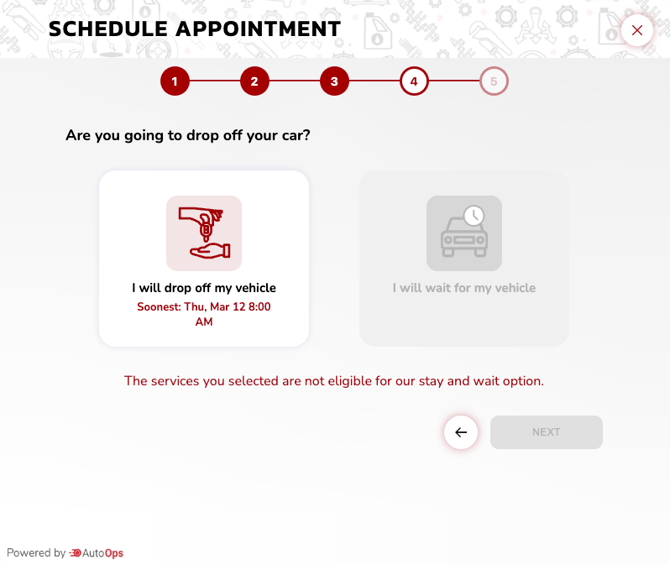
Give customers the option to book the next available time instantly when scheduling online.
**Why you'll love it:**
- Customers have the option to get in as quickly as possible
- Fill gaps in your schedule
➡️ [Learn how to turn on](https://help.steercrm.com/knowledge/how-to-enable-soonest-available-bookings-in-autoops?hsLang=en) Soonest Available bookings.
[](https://help.steercrm.com/knowledge/how-to-enable-soonest-available-bookings-in-autoops?hsLang=en)
#### Customizable Notes
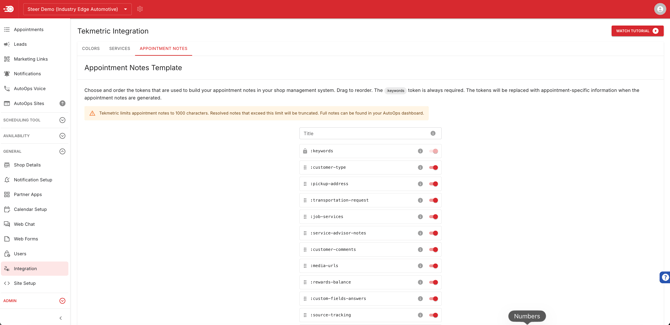
Customize the formatting of appointment notes in your shop management system so you can better organize notes.
**Why you'll love it:**
- Keep your team aligned on important details
- Improve the customer experience at appointment time
- Available for most shop management systems now
➡️ [Learn more](https://help.steercrm.com/knowledge/customizable-shop-management-system-notes-tekmetric?hsLang=en) about customizable notes for your SMS.
#### Dismiss Deferred Work
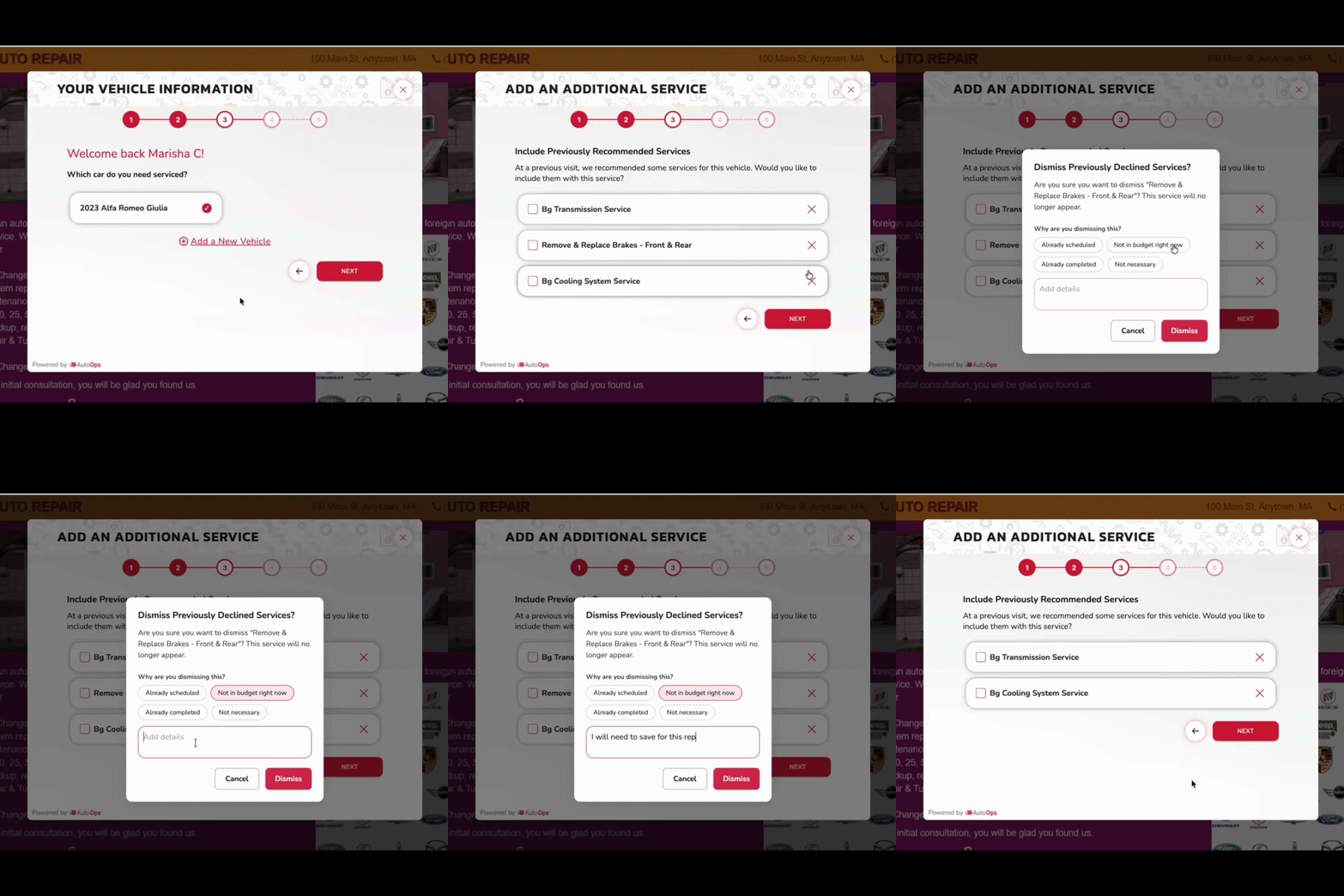
Customers can move past deferred work during the booking process.
**Why you'll love it:**
- Understand why the work is being deferred, whether due to finances, schedules, or something else
- Get a notification when customers dismiss the deferred service
[➡️ Learn how to add](https://help.steercrm.com/knowledge/allow-customers-to-dismiss-deferred-work-during-booking-in-autoops?hsLang=en) the option for customers to dismiss deferred work.
#### Manage & Create Your Own Web Forms
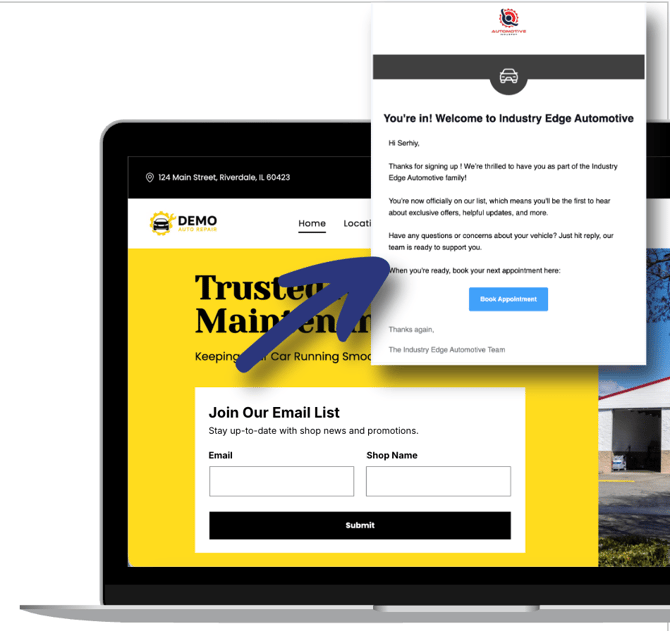
Collect more information from customers or leads with customizable forms directly on your website.
**Why you'll love it:**
- Get improved visibility into how and where leads are generated
- Use the info from the form to create campaigns in Steer to get a full picture of how customers respond to your outreach
➡️ [Learn how to create](https://help.steercrm.com/knowledge/manage-and-create-web-forms-via-autoops-and-steer?hsLang=en) a web form
[](https://help.steercrm.com/knowledge/manage-and-create-web-forms-via-autoops-and-steer?hsLang=en)
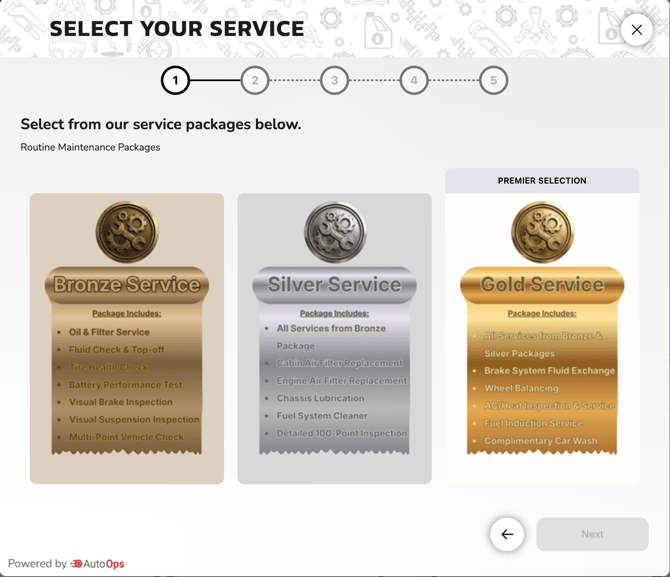
#### Add Full Size Images to Your Issue Tree
Customize your Issue Tree with your own images to help distinguish service packages, oil change tiers, or good, better, best offerings. Or to just add more branding!
**Why you'll love it:**
- Make it easier for customers to understand the differences between service offerings
- Create a consistent and repeatable way to present and upsell services
➡️ [Learn how to add](https://help.steercrm.com/knowledge/how-to-create-and-modify-advanced?hsLang=en) images to your issue tree in AutoOps
[](https://help.steercrm.com/knowledge/how-to-create-and-modify-advanced?hsLang=en)
### What's New in Steer?
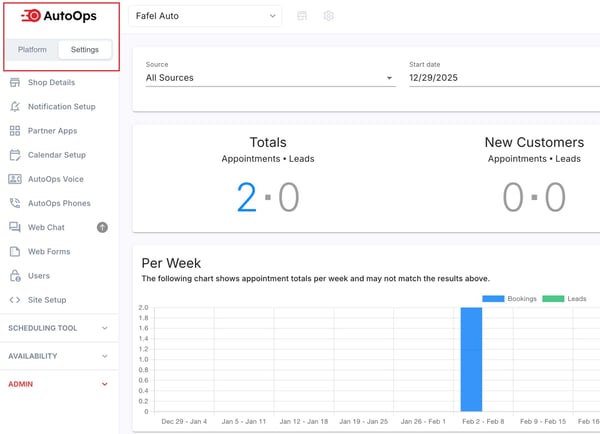
#### A NEW Look to the AutoOps Dashboard
Have you checked out the updated AutoOps UI? This is our next step in bringing together Steer and AutoOps in look and feel. The menu is reorganized into two tabs:
- **Platform** for your day-to-day work
- **Settings** for setup and configuration
All the functionality you know and love is the same, just with better organization and usability.
#### Coming Soon: Steer \<\> AutoOps Switch
No more managing separate logins 🎉 You'll soon be able to switch between Steer and AutoOps with one click.
AO-Toggle.jpg?width=670&height=377&name=Steer()AO-Toggle.jpg)
#### Coming Soon: Smart Search
Instead of manually setting filters and value ranges to create customer segments, now you can describe the segment you're trying to build and Smart Search will automatically apply the correct filters.
Try segments like "*Customers with a valid email who have opted out of email*" or "*Customers with vehicles older than 2015 with declined brake services*". Or try one of the pre-built segments like "Overdue Regulars" and "Recent Reviews".
.png?width=670&height=723&name=Untitled%20design%20(4).png)
**Why you'll love it:**
- No more digging through filters to experiment with segment building
- Build campaign segments in just a few clicks
#### Coming Soon: Q2 Marketing Calendar
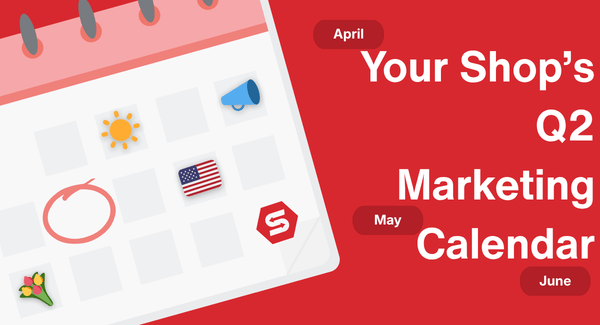
We updated our template library with brand new Spring-themed templates, and our Q2 Marketing Calendar will give you all the tips and tricks you need to build and launch them. Everything from April Fool's to Father's Day is covered.
Want to use our new Spring templates now? Just search "spring" in the templates library.
**Why you'll love it:**
- Seasonal campaign suggestions designed to convert
- Build your calendar ahead of time to keep your outreach consistent
### Sneak Peek: Steer Phones
The feature you've been waiting for: A phone system built for the shop.
Steer Phones connects your phones to the rest of your front-of-house, so every call becomes a booking opportunity instead of a missed one.
- Combine calls, texts, and emails into one holistic customer journey
- Surface customer history, vehicle info, and visit details the moment the phone rings
- Track and analyze calls to help improve performance
**Phones will help your shop:**
- Turn more calls into booked jobs, with better context and faster responses
- Understand what's happening on the phones and provide coaching backed by real data
- Give every customer a more personal experience
Join our [**early access list**](http://www.steer.io/features/phones)to be the first to hear about when we're rolling this out and get priority onboarding.
- [Booking](https://help.steercrm.com/knowledge/booking?hsLang=en#main-content)
- [Steer x AutoOps](https://help.steercrm.com/knowledge/booking?hsLang=en#steer-x-autoops)
- [Lead Management & Marketing Tracking](https://help.steercrm.com/knowledge/booking?hsLang=en#lead-management-marketing-tracking)
- [Availability & Capacity Management](https://help.steercrm.com/knowledge/booking?hsLang=en#availability-capacity-management)
- [Issue Tree Management](https://help.steercrm.com/knowledge/booking?hsLang=en#issue-tree-management)
- [Steer Scheduling Tool (Retiring Soon)](https://help.steercrm.com/knowledge/booking?hsLang=en#steer-scheduling-tool-retiring-soon)
- [AutoOps Websites](https://help.steercrm.com/knowledge/autoops-websites?hsLang=en#main-content)
- [Tutorials & Videos](https://help.steercrm.com/knowledge/autoops-websites?hsLang=en#tutorials-videos)
- [Website Editor Guides](https://help.steercrm.com/knowledge/autoops-websites?hsLang=en#website-editor-guides)
- [AutoOps Pro Features](https://help.steercrm.com/knowledge/autoops-pro-features?hsLang=en#main-content)
- [AutoOps Website Chat](https://help.steercrm.com/knowledge/autoops-pro-features?hsLang=en#autoops-website-chat)
- [Phones](https://help.steercrm.com/knowledge/phones?hsLang=en#main-content)
- [Step-By-Step Guides](https://help.steercrm.com/knowledge/phones?hsLang=en#step-by-step-guides)
- [Understanding Steer Phones](https://help.steercrm.com/knowledge/phones?hsLang=en#understanding-steer-phones)
- [Marketing](https://help.steercrm.com/knowledge/marketing?hsLang=en#main-content)
- [Outreach Planning](https://help.steercrm.com/knowledge/marketing?hsLang=en#outreach-planning)
- [Campaign Creation & Management](https://help.steercrm.com/knowledge/marketing?hsLang=en#campaign-creation-management)
- [Follow-Up Campaigns](https://help.steercrm.com/knowledge/marketing?hsLang=en#follow-up-campaigns)
- [Outreach Campaigns](https://help.steercrm.com/knowledge/marketing?hsLang=en#outreach-campaigns)
- [Maintenance Reminder Campaigns](https://help.steercrm.com/knowledge/marketing?hsLang=en#maintenance-reminder-campaigns)
- [Deferred Service Campaigns](https://help.steercrm.com/knowledge/marketing?hsLang=en#deferred-service-campaigns)
- [Steer Reviews & Surveys](https://help.steercrm.com/knowledge/steer-reviews-surveys?hsLang=en#main-content)
- [Reputation Management](https://help.steercrm.com/knowledge/steer-reviews-surveys?hsLang=en#reputation-management)
- [Steer Surveys](https://help.steercrm.com/knowledge/steer-reviews-surveys?hsLang=en#steer-surveys)
- [Steer Dashboard Analytics](https://help.steercrm.com/knowledge/steer-dashboard-analytics?hsLang=en#main-content)
- [Steer Data & Analytics](https://help.steercrm.com/knowledge/steer-dashboard-analytics?hsLang=en#steer-data-analytics)
- [Steer Dashboard Management](https://help.steercrm.com/knowledge/steer-dashboard-analytics?hsLang=en#steer-dashboard-management)
- [Steer Customer & Vehicle Profiles](https://help.steercrm.com/knowledge/steer-dashboard-analytics?hsLang=en#steer-customer-vehicle-profiles)
- [Steer Ultimate](https://help.steercrm.com/knowledge/steer-ultimate?hsLang=en#main-content)
- [Auto-Reply](https://help.steercrm.com/knowledge/steer-ultimate?hsLang=en#auto-reply)
- [Call Intelligence/CallerID+](https://help.steercrm.com/knowledge/steer-ultimate?hsLang=en#call-intelligence-callerid)
- [Digital Glovebox](https://help.steercrm.com/knowledge/steer-ultimate?hsLang=en#digital-glovebox)
- [Opportunity Hub/Today's Call List](https://help.steercrm.com/knowledge/steer-ultimate?hsLang=en#opportunity-hub-todays-call-list)
- [Mobil 1™ Performance+](https://help.steercrm.com/knowledge/mobil-1-performance?hsLang=en#main-content)
- [Mobil 1 AutoOps Menu](https://help.steercrm.com/knowledge/mobil-1-performance?hsLang=en#mobil-1-autoops-menu)
- [Mobil 1 Dashboard & Rebates](https://help.steercrm.com/knowledge/mobil-1-performance?hsLang=en#mobil-1-dashboard-rebates)
- [Mobil 1 Maintenance Reminders](https://help.steercrm.com/knowledge/mobil-1-performance?hsLang=en#mobil-1-maintenance-reminders)
- [Admin & Settings](https://help.steercrm.com/knowledge/admin-settings?hsLang=en#main-content)
- [Steer General Settings](https://help.steercrm.com/knowledge/admin-settings?hsLang=en#steer-general-settings)
- [Integrations](https://help.steercrm.com/knowledge/admin-settings?hsLang=en#integrations)
- [Texting Compliance](https://help.steercrm.com/knowledge/admin-settings?hsLang=en#texting-compliance)
- [User Permission & Notifications Settings](https://help.steercrm.com/knowledge/admin-settings?hsLang=en#user-permission-notifications-settings)
- [What's New?](https://help.steercrm.com/knowledge/whats-new?hsLang=en#main-content)
- [Steer Updates: 2026](https://help.steercrm.com/knowledge/whats-new?hsLang=en#steer-updates-2026)
- [2025 & Older Releases](https://help.steercrm.com/knowledge/whats-new?hsLang=en#2025-older-releases)
[](https://help.steercrm.com/knowledge?hsLang=en)
[Book a Demo](https://steer.io/book-a-demo)
Copyright © 2025, Steer