Skip to content
English
  • There are no suggestions because the search field is empty.

Creating Your Q3 Marketing Outreach Calendar

How to keep your marketing momentum going in Q3 with ready-to-send campaigns.

We recommend shops send at least two outreach campaigns each month to stay top of mind and drive repeat business. The Q3 Campaign Calendar helps you build a consistent outreach cadence with seasonal campaigns designed around real customer opportunities, from summer travel to deferred work and vehicle longevity.

Jump to:

July campaigns

August campaigns

September campaigns

Adding Segments to a Campaign


July Campaigns

Fourth of July AND America's 250th Birthday

Did you hear that the USA is turning 250 this year? Use this historic holisay as an opportunity to bring in customers before the busy holiday travel season begins. A few suggested segments to target:

  • Customers who haven't received tire service in the last 12 months
  • Customers who haven't had an alignment in 12+ months


Q3 Marketing Calendar (1)


Build Segment with Smart Search Build Segment withSetup Advanced Filters
  1. From the Dashboard, click Customers > Customer List

  2. Click the Smart Search button.

  3. Enter the text "Customers who haven't received tire service in the last 12 months".

  4. Click Find Customers.

  5. Save the group.

  6. Save as a Dynamic Group by selecting Filters again after reviewing the list, then click New Dynamic Group. Add a group name from Step 5.

  7. Click Save.

    1. From the Dashboard, click Customers.

    2. Click Filters, then select Advanced Filters.

    3. Select the Invoices filter.

    4. Enable the Invoice Search toggle.

    5. Enter a tires as the invoice keyword.

    6. Select the Appointments filter.
    7. Enable the Days Since Appointments filter.
    8. Enter 0-365 as the date range
    9. Save the group.

    10. Save as a Dynamic Group by selecting Filters again after reviewing the list, then click New Dynamic Group

    11. Click Save.


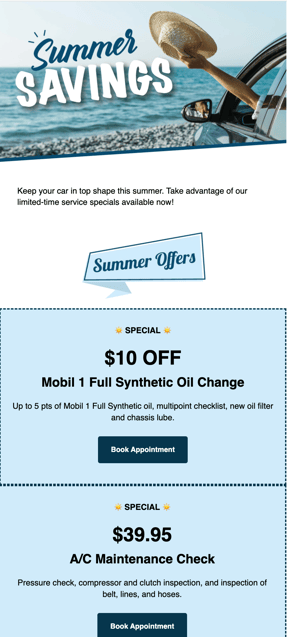
    Summer Savings

    Q3_Summer Savings Campaign


    Summer travel is a great excuse to bring customers in to make sure their vehicles are ready for summer heat.


    Suggested segments for this campaign:

    • Reach out to customers who haven't visited in 12-18 months to remind them to bring their vehicle in before hitting the road.
    • Offer services like AC checks


    August Campaigns

    Back to School

    Back-to-school season means busy schedules, carpool lines, and teen drivers returning to the road. Help customers start the school year with confidence through maintenance and safety-focused outreach, or strengthen community connections with a backpack drive that gives families a way to support local students while supporting your shop.
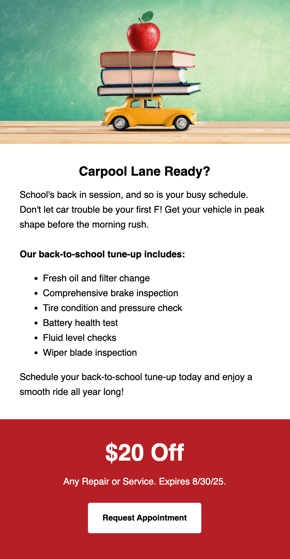
    Q3_Back to School Campaign


    Suggested segments for this campaign:

    • Customers with deferred AC repairs
    • Customers with declined maintenance services > $300
    • Customers with deferred repairs from the last 6-12 months


    Build Segment with Smart Search Build Segment with Advanced Filters
    1. Login to Steer.

    2. From the Dashboard, click Customers > Customer List

    3. Click the Smart Search button.

    4. Enter the text "Customers with quotes older than 7 days".
    5. Click Find Customers.
    6. Save the group (i.e. Outstanding Quotes > 7 Days).

    7. Save as a Dynamic Group by selecting Filters again after reviewing the list, then click New Dynamic Group. Add a group name from Step 6.

    8. Click Save.
    1. Login to Steer.
    2. From the Dashboard, click Customers.
    3. Click Filters, then select Advanced Filters.
    4. Select the Quotes filter.
    5. Enable to Days Since Quote toggle.
    6. Enter a value range of 7 - 365.
    7. Click Show Results.
    8. Save the group.
    9. Save as a Static Group. Check the box at the Top Left of your filtered list, then click New Static Group. Add a group name from Step 8.
    10. Click Save.
    Q3_Back to School Campaign_2


    Encourage customers to give back by hosting a backpack or school supply drive.

    Pair the community activity with a promo for $$$ off a service for customers who participate as a way to fill your bays (and fill backpacks!)

    Suggested segments for this campaign:

    • Customers with deferred brake services
    • Customers with deferred tire services
    Build Segment with Smart Search Build Segment with Advanced Filters
    1. Login to Steer.

    2. From the Dashboard, click Customers > Customer List

    3. Click the Smart Search button.

    4. Enter the text "Customers with deferred brake or tire services".
    5. Click Find Customers.
    6. Save the group.

    7. Save as a Dynamic Group by selecting Filters again after reviewing the list, then click New Dynamic Group. Add a group name from Step 6.

    8. Click Save.
    1. Login to Steer.
    2. From the Dashboard, click Customers.
    3. Click Filters, then select Advanced Filters.
    4. Select the Deferred Services filter.
    5. Enable to Deferred Services toggle.
    6. Enter Tires and Brakes in the Deferred Service Search space.
    7. Click Show Results.
    8. Save the group.
    9. Save as a Static Group. Check the box at the Top Left of your filtered list, then click New Static Group. Add a group name from Step 8.
    10. Click Save.

    September Campaigns

    With vehicle ownership costs remaining high, many customers are keeping their vehicles longer. Help them protect that investment with preventative maintenance and vehicle health checks.

    LaborDay
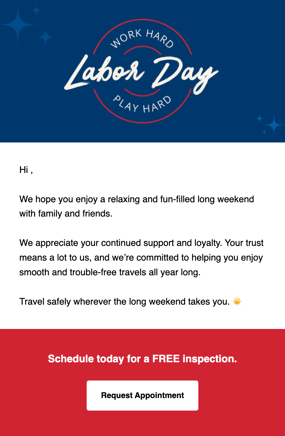
    Q3_Labor Day Campaign

    Labor Day is a great time to pass savings on to customers with older vehicles, or customers who haven't been into the shop for awhile.

    Suggested segments for this campaign:

    • Vehicles 7+ years old

    • Customers who have not visited in 9-12 months

    Build Segment with Smart Search Build Segment with Advanced Filters
    1. Login to Steer.

    2. From the Dashboard, click Customers > Customer List

    3. Click the Smart Search button.

    4. Enter the text "Customers with vehicles older than 2019 who haven't visited in 9-12 months".
    5. Click Find Customers.
    6. Save the group.

    7. Save as a Dynamic Group by selecting Filters again after reviewing the list, then click New Dynamic Group. Add a group name from Step 6.

    8. Click Save.
    1. Login to Steer.

    2. From the Dashboard, click Customers.

    3. Click Filters, then select Advanced Filters.

    4. Select the Customer Visits filter.

    5. Enable the Days Since Last Visit toggle.

    6. Enter a range of 270 - 365.

    7. Select the Vehicle Data filter.
    8. Enable the Search vehicles by toggle.
    9. Select Year Range.
    10. Enter a value range of 1914 - 2018.
    11. Click Show Results.

    12. Save the group.

    13. Save as a Dynamic Group by selecting Filters again after reviewing the list, then click New Dynamic Group. Add a group name from Step 8.

    14. Click Save.

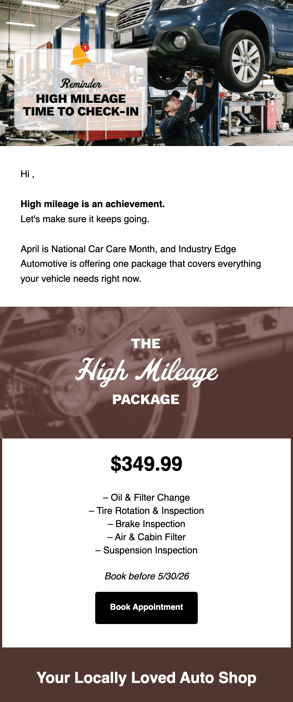
    High Mileage

    Q3_High Mileage Campaign

    Customers are really focusing on extending the life of their vehicle as cost of ownership has increased over the last few years.

    Help them protect their investment by sending them a specialized offer for high mileage vehicles.

    Suggested segments for this campaign:

    • Target customers with vehicles that have 100,000+ miles

    Learn about sending maintenance reminders in our article here.

    Adding Segments to Your Campaign

    Ready to build your campaign? Once you've created segments for your campaign, you can get your campaign out the door and into your customers' inboxes. Here's how to add the segment to a campaign:

    1. Click Campaigns, then select Active.
    2. Choose the Campaign Category for your campaign (i.e. Outreach), click New Segment.
    3. Add a name for your campaign segment (i.e. Lifetime Visit Value $500+).
    4. Select the Select Customer Group tab to choose one of your newly created segments.
    5. Click Save.

    More info on creating customer groups, campaigns, and segments can be found here.